
This content is protected against AI scraping.
Data Privacy in Hospitality Series
Part 2: Restaurants & Dining – The Menu of Digital Risks
In a hotel, the guest relationship is defined by a 24-hour cycle. In a restaurant, it is defined by a 90-minute cycle. The speed of service often forces data privacy to take a backseat.
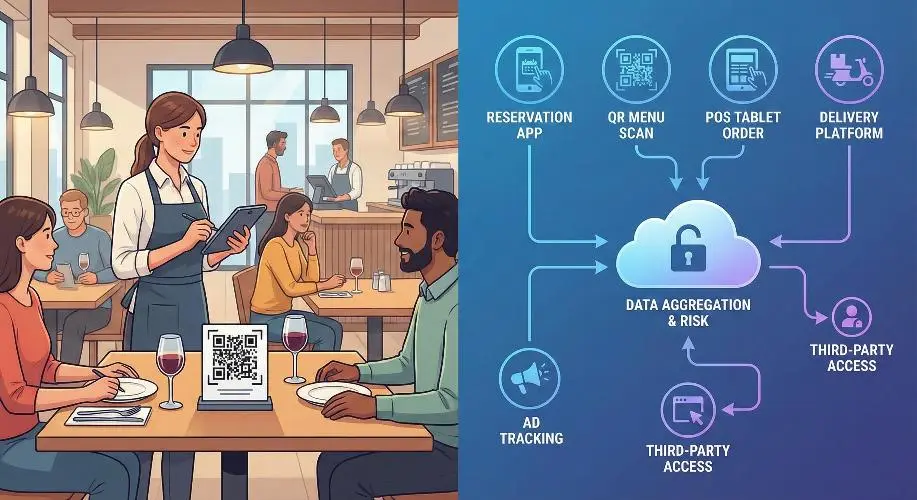
From “Pay-at-Table” tablets to QR code menus and third-party delivery apps, restaurants are processing vast amounts of personal and financial data. This article explores how to serve guests without serving up their data to hackers.
Phase I: The Reservation & The Queue
The digital maitre d’ knows more than just names.
1. Reservation Platforms (OpenTable, Resy, SevenRooms)
- The “Guest Notes” Field: Staff often use this free-text field to record personal details (“Guest is difficult,” “Wife’s name is Sarah,” ” allergic to shellfish”).
- Privacy Risk: Storing subjective or sensitive opinions about guests can violate “Right to Rectification” laws. If a guest requests their data file (Subject Access Request), they will see these notes.
- Best Practice: Keep notes factual and professional. Avoid “blacklisting” comments unless legally justifiable.
- SMS Queue Management: Apps that text guests when their table is ready.
- Risk: Are you harvesting these mobile numbers for marketing without a separate opt-in? Using a “Table Ready” number for “Tuesday Taco Offers” is a GDPR/CCPA violation.
2. The “No-Show” Liability
- Credit Card Holds: To prevent no-shows, restaurants increasingly ask for credit cards upfront.
- Risk: Writing these numbers down in a physical reservation book or storing them in an unencrypted file on the host stand iPad.
Phase II: The Digital Table (Ordering & Menus)
The shift from paper to pixels.
1. QR Code Menus: The Privacy Trojan Horse
- The Tracking Cookie: Scanning a QR code often does more than open a PDF. It can drop a cookie on the guest’s phone to retarget them with ads later.
- Data Scraping: Some “free” QR menu generators monetize by selling the user analytics (device type, location, dwell time) to third parties.
- “Menu Engineering” Data: Digital menus track exactly how long a guest looks at the wine list vs. the dessert menu. This behavioral profiling must be disclosed in the privacy policy.
2. Handheld Ordering Devices (POS Tablets)
- The Waiter’s Pad vs. The Tablet: When a server enters an order at the table, are they also entering guest descriptions to identify the seat? (e.g., “Lady in red dress”).
- Risk: PII (Personally Identifiable Information) combined with physical descriptions stored in the transaction logs.
Phase III: The Meal & Health Data
Food allergies are medical data.
1. Allergen Management (Special Category Data)
- The Legal Distinction: Under GDPR and similar laws, a “Peanut Allergy” is considered health-related data.
- The Operational Gap: Kitchens print “Allergy Tickets” and stick them to the pass.
- Breach Scenario: An allergy ticket with a table number and guest name is left on a tray in the dining room or thrown in an open bin.
- Policy: Health data requires Explicit Consent to be stored. You cannot save a guest’s allergy profile for their next visit without their specific, written permission.
2. Payment at the Table
- “Pay-at-Table” vs. “Card Away”: Taking a credit card away from the table is a massive security risk (skimming).
- Digital Receipts: Asking “Text or Email receipt?” is a common data capture tactic.
- The Trap: The staff member inputs the email incorrectly, sending financial data to a stranger. Or, the email is automatically added to a marketing list without consent.
Phase IV: Beyond the Walls (Delivery & Third Parties)
The guest you never see.
1. The Delivery App Dilemma (UberEats, DoorDash, Deliveroo)
- Who Owns the Data? In most cases, the Platform (Uber) owns the customer data, not the restaurant.
- The “Stapled Receipt” Risk: Delivery bags often have a receipt stapled to the outside containing the customer’s full name, address, phone number, and door code.
- Risk: If this bag is left in a lobby or misdelivered, PII is exposed.
- Best Practice: Redact phone numbers and door codes on the external receipt.
2. Ghost Kitchens & Virtual Brands
- Data Fragmentation: One kitchen may cook for 5 different virtual brands. Ensuring data segregation between these brands is critical to prevent cross-contamination of marketing lists.
Phase V: Building a Restaurant Privacy Framework
Operational steps for GMs and Owners.
- Clean Up the Host Stand: Lock the reservation iPad. Do not leave the physical reservation book open where waiting guests can read names and times.
- Secure the POS: Change the default admin passwords (e.g., “1234”) on all POS terminals. Ensure servers have unique logins to trace data mishandling.
- Vendor Vetting: Audit your QR code provider. Do they sell data? If yes, switch to a paid, private provider.
- Staff Training:
- Script: “May I add your email for a receipt?” (Not for marketing).
- Action: Shred kitchen tickets; do not bin them whole.
Q&A: Common Questions from Restaurant Operators
A quick-reference guide for the busy General Manager.
Q1: Can I ban a rude customer and put their name on a ‘Do Not Serve’ list?
A: You can refuse service, but maintaining a formal “blacklist” with personal data is risky. You must have a “Legitimate Interest” (e.g., safety of staff) to store this data. Ensure it is factual (e.g., “Threatened staff on [Date]”) rather than subjective (“Rude/Annoying”). You should not share this list with other restaurants, as that constitutes a data sharing ring without consent.
Q2: A regular guest wants us to remember their wine preference and allergy. Can we just write it in the system?
A: For wine preference (commercial preferences), usually yes—under “Legitimate Interest” to improve service. For Allergies (Health Data), you technically need Explicit Consent. The best way is to send a welcome email to regulars asking them to update their profile preferences, including a checkbox for dietary needs.
Q3: We use a “Guest WiFi” that asks for Facebook Login. Is this safe?
A: It is common, but risky. You become a Joint Controller with Facebook. You are responsible for telling the guest that Facebook is tracking them. A safer option is a simple “Email for WiFi” splash page where you control the data and offer a clear “Opt-out of marketing” box.
Q4: Can we use the phone numbers from our delivery tablet (e.g., UberEats) to text customers a coupon for direct ordering?
A: Absolutely not. This is a major violation. The customer gave their number to UberEats for that specific delivery, not to you for marketing. Using this data for SMS marketing is “purpose limitation” breach and can lead to heavy fines and being banned from the delivery platform.
Q5: How long should we keep reservation data?
A: Don’t be a data hoarder. If a guest hasn’t visited in 18-24 months, anonymize their data. Keep the financial transaction record for tax purposes (7 years), but delete the profile linkage (Name/Email).
Great Hospitality Requires Great Privacy. Your guests trust you with their dinner and their dreams—don’t lose that trust over a data leak. Let’s build a privacy framework that protects your reputation without slowing down your service. Free Consultation
Next Up: Part 3: Health Resorts & Spas. We will look at the most sensitive sector of hospitality, where medical questionnaires and biometric data meet luxury service.
Catch up on Part One : The Hotel Ecosystem – Safeguarding the Guest Personal Data Journey